


On 3 September 2026 the BOE (Spain’s official gazette) published Real Decreto 707/2026, de 2 de septiembre, which approves the first national Regulation on basic conditions of cognitive accessibility. It enters into force on 2 January 2027 and is not limited to public bodies: it reaches private providers of information society services and the goods and services made available to the public. A hotel, a hostel and a holiday rental all fit that description.
Cognitive accessibility is not translating your website, and it is not WCAG compliance. It is whether a guest understands what you are asking for, why, what happens if they make a mistake and who to turn to: in the booking, the consent, the check-in, the signature, the payment, the house rules, the signs and the complaints form.
This article separates the three calendars you should not merge, turns articles 4 to 9 of the regulation into an audit of the guest journey, and leaves you a reusable table and a 90-day plan. It informs and orients; it does not replace legal or technical advice.
What cognitive accessibility is and who it protects
The regulation defines cognitive difficulties as the barriers a person meets in understanding, communicating and interacting with other people and with their environment, arising from disability, health conditions, age, socioeconomic factors (such as poverty or illiteracy) or contextual factors (such as not knowing the language), among other circumstances (article 3).
Translated to an accommodation, the list of people who can stumble on your check-in is longer than it looks:
- A 78-year-old guest booking from a phone for the first time.
- A person with autism who cannot process information at a desk with loud music and three contradictory signs.
- Someone with an acquired brain injury who needs the instruction not to move halfway through the process.
- A family that does not speak Spanish and accepts a cancellation policy without having understood it.
- A traveller after a twelve-hour flight, phone at 4 %, facing a key box with an eight-step code.
Three cautions that come from the text itself:
- No diagnosis needed. The rule protects situations, not labels. Do not ask a guest to prove anything before giving them clear information.
- It is not translation. A badly written text stays confusing in four languages.
- It is not WCAG and it is not physical accessibility. They complement each other, but a form that passes a contrast checker can still be incomprehensible.
Three calendars you should not merge
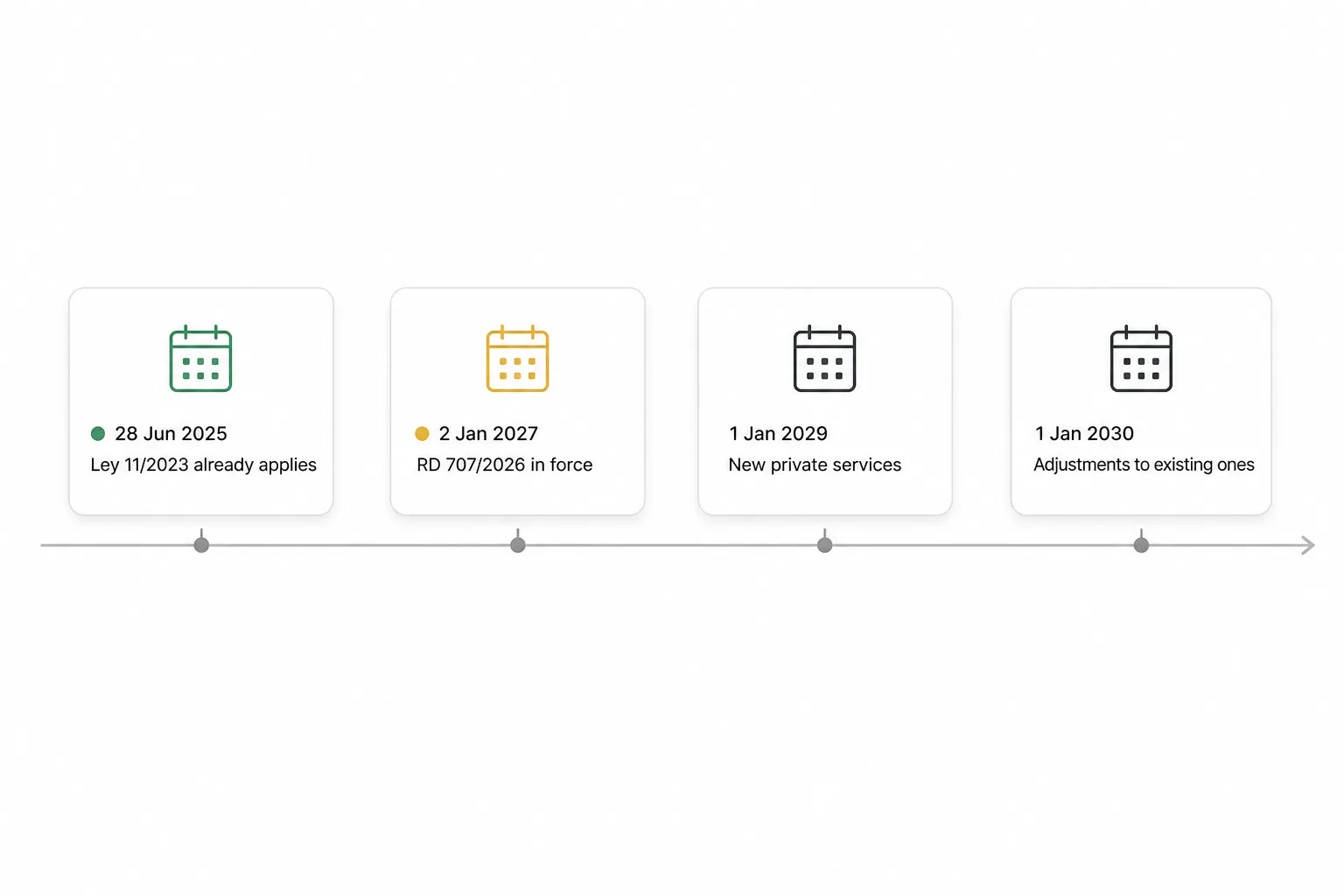
The date in every headline is 2 January 2027. That is when the regulation enters into force, and the regulation contains no transitional provisions. But it coexists with two earlier norms that have their own timelines, and article 9 expressly applies “without prejudice” to both.
| Norm | What it regulates | Key date | Who it covers |
|---|---|---|---|
| Real Decreto 707/2026 | Basic conditions of cognitive accessibility | In force on 2 January 2027 | Public bodies and private providers in the areas listed in article 5 of the General Law |
| Real Decreto 193/2023 | Accessibility and non-discrimination in goods and services available to the public | 1 January 2029 (new) and 1 January 2030 (existing) | Private goods and services; new ones, then reasonable adjustments on existing ones |
| Ley 11/2023 (Directive 2019/882) | Accessibility requirements of specific products and services, including e-commerce | Applies since 28 June 2025; transitional period until 28 June 2030 | The services the law lists; contracts signed earlier may run until 2030 |
What that table does not settle, and what you decide with advice: whether your booking website is an information society service (article 6, enforceable from 2027), a good or service under chapter III of RD 193/2023 (with its 2029 and 2030 calendar), or both at once depending on the screen. The answer changes with the service, the channel and whether the works or the software are new or existing. That is why the 90-day plan below starts with an inventory, not a refurbishment.
Plain language, clear language and easy-to-read
The regulation uses three different terms and attaches different duties to each. Confusing them is the most common mistake, and the most expensive one, because calling a shortened text “easy-to-read” does not make it easy-to-read.
| Term | What article 3 says it is | Where the regulation requires it from an accommodation |
|---|---|---|
| Plain language (lenguaje sencillo) | Spoken or written communication that puts people first: short sentences, common words, no unexplained acronyms | The default minimum (article 5.2). Basic commercial information, contracting, consent and instructions (article 9) |
| Clear language (lenguaje claro) | Communication that prioritises the reader and considers what they need to know, their experience, literacy and context (UNE-ISO 24495-1) | Occupational risk prevention documentation (article 14) |
| Easy-to-read (lectura fácil) | A method with guidelines for writing, design, layout and validation of documents (UNE 153101) | The complaints form (article 9.2) and workplace training (article 14) |
Standard UNE 153101:2018 EX describes two processes, adapting and creating documents, and in both the validation phase is led by people with reading comprehension difficulties. A machine translation or an automatically generated summary does not count as that validation. If you need an easy-to-read complaints form, commission it from someone who can validate it.
The guest’s digital journey: articles 4 to 6
Article 4 lists the universal design principles: equitable use, flexible use, intuitive and simple use, perceptible information, tolerance for error, reduced effort, control of sensory stimuli, and size and space for access and use. Article 5 sets the general requirements: content that is easy to understand, in written, pictographic or audio format or with supports; at no additional cost, even when delivered through apps or virtual assistants; and without the request for an adaptation causing undue delay.
Article 6 lands all of that on digital services. It obliges information society service providers established in Spain to apply cognitive accessibility measures to:
- Textual and non-textual content.
- Documents and forms.
- Multimedia content.
- Interaction systems and mechanisms and, expressly, the ways consent is given and the processes of identification, authentication, signature and payment, plus the digital tools tied to contracting and accepting terms.
Article 6.4 adds that customer service channels must offer diverse formats, with express attention to help, invoices, payment gateways, contact and complaints.
Auditing the digital journey
Turn every screen into a question. If the answer is “no”, you have a row for the table further down.
| Step | Audit question |
|---|---|
| Booking page | Is the total price, what it includes and when it is charged clear without opening another tab? |
| Confirmation | Does the first screen say what happened, what is missing and what to do now? |
| Cancellation policy | Is there a plain-language version before accepting, not only the legal text? |
| Data consent | Does it say which data, what for and for how long, one sentence per item? |
| Identification and document | Does it show an example of what is needed and flag errors immediately, not at the end? |
| Authentication | Is there a route with no password to remember (link, one-time code, QR)? |
| Signature | Can the guest read what they are signing at the same size and in the same language as the rest? |
| Payment, deposit or bond | Is it clear what is charged now, what is held and when it comes back? |
| Help | Is there a visible human-help button at every step, without leaving the process? |
This is where a check-in app helps or hurts. It reduces cognitive load if it asks only for what is needed, explains why, shows progress, keeps what is already completed, allows corrections and offers help. It creates a barrier if it forces the guest to remember passwords, chains opaque consents or leaves them with no alternative. A check-in link with a QR code that opens without an account or password removes the first obstacle; a form that saves drafts and validates each field as you go removes the second. Which data a traveller report needs and why is in the guide to traveller registration.
Any personalised support (large text, a guided version, a reminder) is designed with data minimisation: do not record that a guest “needs help” unless it is strictly necessary and they asked for it. How guest data should be handled is covered in the post on guest data protection.
Guest service and consumer duties: article 9
Article 9 applies to providers of the goods and services regulated in chapter III of RD 193/2023, who must apply the principles of article 4 and the requirements of article 5, and in addition:
- Publish information about every service in cognitively accessible formats and media (9.1.a).
- Enable augmentative and alternative communication and communication supports so that nobody is excluded (9.1.b).
- Have support products, assistive technology and, where needed, adequately trained staff available (9.1.c).
- Provide basic commercial information in plain language and, where possible, with other visual supports (9.2.a).
- Guarantee a complaints form in easy-to-read format (9.2.b).
- Convey contracting, consent and instructions for use in plain language (9.3).
With article 5 on top, the adaptation cannot carry an extra charge or cause undue delay, especially where a right, a complaint or an emergency is at stake.
Which documents to review first in an accommodation
Prioritise by consequence: safety, rights, amounts, deadlines and irreversible decisions.
- Evacuation protocol and emergency signs.
- Complaints form in validated easy-to-read format.
- Cancellation, deposit and bond. Amounts, dates and what happens if they are not met.
- Data consent and entry report.
- Access instructions. What to do if it does not open, who to call.
- House rules. Fewer prohibitions, more “how it works”.
- Breakfast and allergens.
- Floor plan and wayfinding.
- Booking confirmation and welcome letter. Essentials first.
The building: what article 7 requires and what it does not
Article 7 refers to Orden TMA/851/2021 for urban public spaces and to the Código Técnico de la Edificación (Spain’s Building Code) for buildings. Cognitive accessibility conditions are enforceable in newly built buildings, in major interventions on existing buildings and, in all other interventions on existing buildings, only in the elements affected by the intervention (article 7.3).
In other words: the regulation does not order every hotel to be refurbished. It orders that, when you build or intervene, the part you touch is cognitively accessible. Low-cost measures that do not wait for building works, always checked against the applicable technical rules:
- Consistent wayfinding: one colour per floor, one pictogram per service, always in the same place.
- Unambiguous numbering of rooms and doors, with contrast.
- Understandable routes and exits, with the same pictogram from the room to the street.
- Low-stimulation areas: a corner with no music or screens.
- A visible human alternative: a bell, a phone or a person.
Additional provision two tasks CEACOG (the Spanish Centre for Cognitive Accessibility) with proposing, within three years, a public and free catalogue of pictograms for signage. Until then, use standardised pictograms and do not invent your own.
The employment layer: article 14
Article 14 applies to workers who prove an intellectual disability and a degree of disability of 33 % or more. With that condition met, the employer must train in easy-to-read and alternative formats, write occupational risk prevention documentation in clear language, publish accessible job offers in plain language, allow adaptations in interviews, provide accessible authentication and clocking-in systems, enable augmentative communication and adopt reasonable adjustments to schedules, workload and assistive technology, unless the burden is disproportionate.
Two warnings. The 33 % threshold is an employment rule; it does not carry over to guests, who have to prove nothing to receive clear information. And several employment mandates (what counts as an “accessible clocking-in system”, when a burden is disproportionate) raise application questions that belong to your employment adviser, not to this article.
Reusable table: moment, barrier, adjustment, owner, evidence
Copy this table, fill it with your own screens and signs and keep it. It is your inventory and, if an inspection or a complaint arrives, your proof of diligence.
| Moment | Common barrier | Adjustment | Owner | Evidence |
|---|---|---|---|---|
| Website booking | Final price hidden behind several steps | Total and breakdown on the first screen, in plain language | Web manager / booking engine | Dated screenshot |
| Confirmation | Long email, the important part at the end | Three blocks: what, when, what to do now | Owner / PMS | Versioned template |
| Cancellation | Legal text only | Plain-language summary before accepting | Owner + adviser | Approved text and date |
| Data consent | Chained checkboxes with no explanation | One sentence per item and purpose; help on the same step | Check-in provider | Form version log |
| Identification and document | Error shown at the end of the process | Field-by-field validation and a visible example | Check-in provider | Test report |
| Authentication | A password to remember | Link or one-time code | Check-in provider | Documented flow |
| Signature | Small text in another language | Same size, same language, summary first | Provider + owner | Sample signed document |
| Payment, deposit or bond | Unclear what is held and when it returns | Amount, reason and refund date before paying | Owner / payment gateway | Screenshot and published policy |
| Access instructions | Multi-step code with no alternative | Numbered steps with photos, help phone number | Owner | Versioned access guide |
| House rules | A list of prohibitions | A “how it works” list with pictograms | Owner | Document and photo of the sign |
| Emergencies | Sign with dense text | Pictograms, one action per line, marked route | Owner + technician | Dated photo and technical report |
| Complaints | Form only in the official format | Validated easy-to-read version | Owner + validator | Validation certificate |
| Reception service | No alternative to the screen | Trained person, plain script, contact channel | Reception manager | Training record |
A 90-day plan
You do not need a consultancy project. You need one owner, the table above and three months.
| Weeks | What to do |
|---|---|
| 1 to 2 | Inventory. List every guest decision point and every document or sign, from the listing to check-out. Use the table as a template. |
| 3 to 4 | Owners and vendors. For each screen or medium, who changes it: you, your PMS, your check-in provider, your technician. Ask each one for their plan. |
| 5 to 6 | Risk and date. Classify each item by consequence (safety, rights, amounts, deadlines, irreversible decisions) and by the norm and date that applies, with advice. |
| 7 to 8 | Fix the critical items. Emergencies, complaints form, cancellation, deposit, consent. Add human help and an alternative channel at every step. |
| 9 to 10 | Train reception. A plain-language script, how to offer support without asking about diagnoses, who to refer to. |
| 11 | Test. Walk through the check-in with a screen reader, with enlarged text, on a poor connection and with someone who knows neither the property nor the language. |
| 12 | Validate and document. If you can, validate with people with cognitive difficulties. Record decisions, any disproportionate burden claimed and the review date. |
Repeat week 12 every six months. CEACOG’s guides and the pictogram catalogue will turn what is today your own judgement into an official reference.
Sanctions: what the regulation says and what it does not
The regulation creates no specific fine for hotels or holiday rentals. Its article 21 refers infringements to Title III of the General Law on the rights of persons with disabilities and their social inclusion (Real Decreto Legislativo 1/2013), to regional legislation and, in employment matters, to the LISOS (the Law on Infringements and Sanctions in the Social Order). Amounts, grading and inspection depend on those norms and on your region. What does carry its own penalty, unchanged, is traveller registration under RD 933/2021.
Frequently asked questions
Do I have to rebuild my website and check-in before 2 January 2027?
Not necessarily all of it. On 2 January 2027 the regulation enters into force; which duties reach each of your services, and from when, depends on whether it is an information society service (article 6), a good or service under RD 193/2023 (2029 and 2030 calendar) or a service under Ley 11/2023 (since 2025). Inventory first, then decide with advice.
Is a short text with simple sentences already easy-to-read?
No. That is plain language, the minimum article 5.2 requires. Easy-to-read is a method with writing, design and layout guidelines and a validation phase led by people with comprehension difficulties (UNE 153101). For an accommodation, the regulation requires it for the complaints form.
Can I charge for an adapted version, or take longer to serve whoever asks for one?
No. Article 5 requires cognitively accessible information to be provided at no additional cost and states that a request for adaptation must not cause undue delay, even when it relies on apps or virtual assistants.
Do I have to ask guests whether they have a disability?
No, and it is better not to. The rule protects situations (age, language, health, context), not diagnoses, and the 33 % threshold in article 14 is an employment rule only. Offer clear information to everyone and help to whoever asks; storing a guest’s condition is a data protection problem you do not need.
Does an online check-in comply with the regulation on its own?
No. It is one more screen in the journey, and it can be the most accessible one or the least. It does its share if it asks only for what is needed, explains why, validates as you go, keeps what is completed and offers help; the accommodation still has to cover signs, rules, complaints and human service.